


This website views at its very best in Firefox web browser, and is not available in a mobile version.
Copyright © All Rights Reserved | Built by Serif Templates






|
|
|
|
|
|
|
The WagenDaten_ is made up of keywords that embellish and fine tune the various performance aspects of your car. When in doubt which Keyword value to enter, the keyword field may be left blank. After getting CTR Creator to read your CTR_Wagen/Bahn.TXT file, if you next select for it to write your CTR_Wagen/Bahn.TXT file it will properly format your TXT file and, usually, create values that closest match the information you've so far entered into your TXT file. After that, before actually creating your OVL's you may want to review your TXT file to confirm the required value data and its formatting, the correct name for the value, and to ensure everything else is to your satisfaction. |
||||
|
|
|
|
|
|
|
It isn't a requirement that CTR Creator write WagenDaten_ or BahnDaten_ files in order to successfully create track OVL's. |
||||
|
|
|
|
|
|
|
Only one train type is allowed per WagenDaten_ TXT file, although we may expand our train with up to six different Car_Model types. Once our car has been successfully Imported, with the use of CTR Creator we can put our car on any other installed track for which we have a Track Sections list. |
||||
|
|
|
|
|
|
|
If you've already entered data into one version of Daten_ and need to process it through another version of CTR Creator the XML can be converted by copying the header of the XML from the required version of XML and pasting that over the header of the version of XML where you've already entered your data. If you've created several WagenDaten_ and BahnDaten_ files, want to run one through CTR Creator and have forgotten which version the Daten_ was created with, this header has in it which version you've used and will serve as a reminder. |
||||
|
|
|
|
|
|
|
Presented at the following link is a list of the WagenDaten_ Keywords and their corresponding descriptions. |
||||
|
|
|
|
|
|
|
|
|
|
|
|
|
|
|
|
|
|
|
When it is added to the WagenDaten_ the LinkCar_ is always located |
||||
|
|
|
|
|
|
|
|
► |
to the rear of every car except for RearCar_, and |
||
|
|
► |
to the front of every car except for FrontCar_, |
||
|
|
|
|
|
|
|
therefore the LinkCar_ is never the first Car_ or the last Car_ in a train. |
||||
|
|
|
|
|
|
|
A LinkCar_Model is great if your train is made up of, say, a horse pulling several different types of train car carriages in which arrangement the horse would be set up as the LinkCar_. For illustrations detailing the placement of LinkCar_s in relation to the other cars in the train see our slideshow The Role Of The MiddleCar_ And Of The LinkCar_. |
||||
|
|
|
|
|
|
|
|
|
|
|
|
|
When adding links and articulations to the various Car_ types these are always located |
||||
|
|
|
|
|
|
|
|
► |
to the front and to the rear of every LinkCar_, |
||
|
|
► |
to the rear of every car except for RearCar_, and |
||
|
|
► |
to the front of every car except for FrontCar_. |
||
|
|
|
|
|
|
|
|
|
|
|
|
|
We've taken our basic starter Car_shape which is 2m long by 1.4m wide, given a couple of the faces a slant, added a few bevels, and then have run up a quick paint job with a simple texture map. You may make your first car with as simple a shape as you like, or if desired you may embellish it a little like we did. We know you're already champing at the bit with an ideal car in mind but don't get too fancy with your car design ideas at this point. |
||||
|
|
|
|
|
|
|
|
||||
|
|
||||
|
We imported our car model and set it up so that the same car is used on three test tracks: |
||||
|
|
|
|
|
|
|
|
A |
Corkscrew, |
||
|
|
B |
WoodenRC, and |
||
|
|
C |
a Water Ride. |
||
|
|
|
|
|
|
|
The face that makes up the base of this car was imported at Z=0, or on the ‘ground’ in SketchUp. |
||||
|
|
|
|
|
|
|
|
|
|
|
|
|
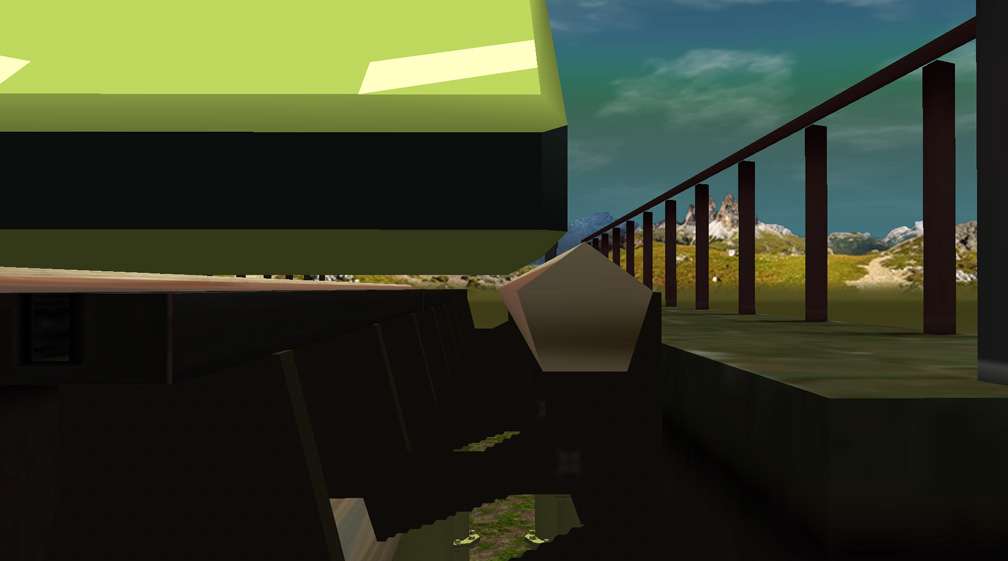
The following image displays the base of our Imported test car at a few centimetres above the brakes on the Corkscrew track and as you see, without the bevels on the edges of this car it would be in contact with the track. This car is already beautifully situated for the eventual addition of side wheels for the rails. If we didn't want wheels and we wanted to make our car model wider it could be raised another 5cm so it doesn't touch the track rail, or the bevel could be extended upwards into the sides of the wider car shape. Do remember that with your car raised 5cm above Z=0 the distance to the base of the car and the steelie brakes would then be 10cm. |
||||
|
|
|
|
|
|
|
|
||||
|
Ultimately you'd want to add a bulge to the bottom of your car to make a hull. You could give your car a shallow hull along with a platen to give the appearance it was interacting with the station brakes, or alternatively you could give your car a deeper hull so that it 'wraps' around the coaster brakes (like Monorail wraps around it's track) and so that it is closer to the track's central support spine. It is not necessary to add a platform at the base of your car's design as they've done with some of the in- |
||||
|
|
||||
|
|
|
|
|
|
|
|
|
|
|
|
|
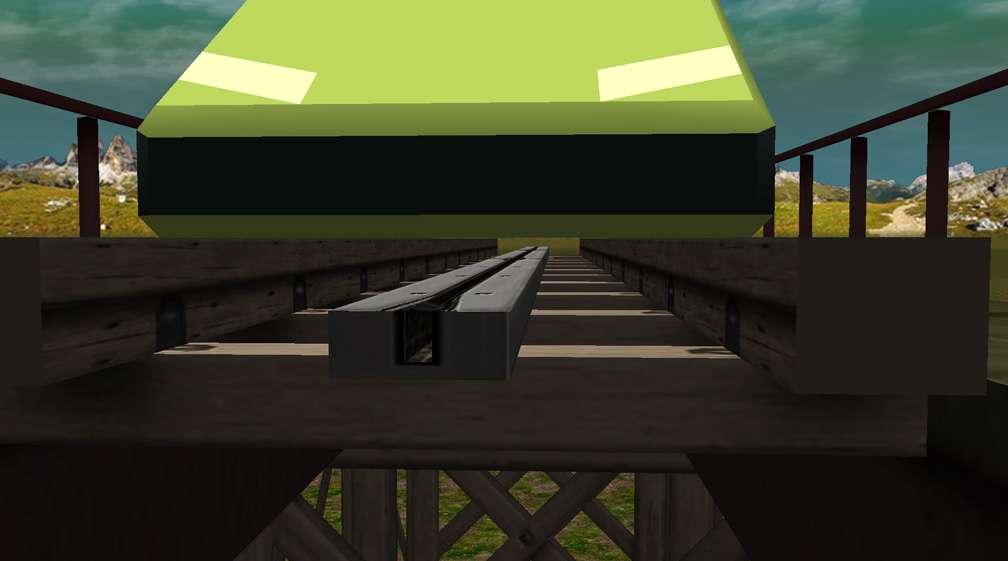
Next, our test with the Wooden Coaster shows the same Import resting precisely on the rails and with a little more space between the bottom of the car and the brakes this time around, say, ten to fifteen centimetres. Again this car is beautifully situated for side wheels placed on the track rails. We might want to raise this car model 5cm so it's not brushing against the rails during its travels around the track, although, in our tests with the car this close to the rail the car gave every indication it was gliding about the track with effortless ease. |
||||
|
|
|
|
|
|
|
|
||||
|
If we were further developing our car model for a woodie and raised the car above the track in view of that, we'd eventually give it a slightly deeper hull than if this car were being placed on a steelie. |
||||
|
|
||||
|
|
|
|
|
|
|
|
|
|
|
|
|
This same car added to a water track makes a float that's just the slightest distance above the water, Of course for a water track we'd want to add a boat shaped hull to the bottom of our craft. Now that we know where the water level is in relation to the base of our car model we'd know where on our model to put the propulsion jets or the outboard engine, any aqua fins, and that when the hull is added our waterline would be painted on our model at or slightly above Z=0. |
||||
|
|
|
|
|
|
|
|
||||
|
Depending on our preferences and the theming of our water craft the boat shaped hull on this car could be any hull shape in any depth we wished. |
||||
|
|
|
|
|
|
|
So based on the information viewed in these three images it's clear that a good spot to start the base of our cars in our modeler is at Z=0 with a view to making minor adjustments depending our car's eventual position in the game on the track on which we're putting our car. |
||||
|
|
||||
|
|
|
|
|
|
|
|
|
|
|
|
|
A Rail & StationTemplates folder is included with CTR Creators' Pack. It comes with twelve different rail types each of which includes a station section. Whether you're adding standard car wheels or wheels that wrap around the rails, these enable you to see the diameter and location of the track rail in relation to the position of your car so that you may achieve a close to accurate placement of your car wheels. Of course, after using these as a guide you'd still need to test the wheel positions on an actual track in the game. |
||||
|
|
|
|
|
|
|
SketchUp RCT3 PlugIns come with three model tracks which place near the terrain. They've been created to make it convenient to loosely match the widths of custom cars with the B&M track, Corkscrew track, and Railway Train track. Because there are nearly 70 different track types that come with RCT3 Vanilla/Soaked!/Wild! in addition to there being dozens of custom track types created by the community, the usefulness of having access to only three of these as a PlugIn model is doubtful. |
||||
|
|
|
|
|
|
|
Although provided for your convenience, we cannot attest to the accuracy of the placement of these track models or rail templates in SketchUp compared with how they'd place in RCT3 and don't see much point in taking the time to create a ride car to line up precisely with a template or PlugIn model, then later testing the placement of this car to see if it lines up with the actual track in RCT3. We therefore stand by our recommendation to create all ride cars at Z=0 and adjust from there after checking in the game. |
||||
|
|
||||
|
|
|
|
|
|
|
|
|
|
|
|
|
Just like the placement of Peeps for park bench CSO's, the placement of Peeps for ride cars is approximate. In real life we'd see a park bench, walk over to it and turn, sit on it, and there we are, sat ideally on the bench due to the restraints of physics and what we feel to be comfortable. The world our park guests live in is quite different and they can't take something like this for granted. Further to this, each version of all six types of male adult, female adult, male teen, female teen, male child, and female child sits a little differently in relation to the same Effect Bone placement with park benches. It's the same for Effect Bone placement with the creation of custom cars. In general, the male teens and both male and female children sit the most accurately with the female adults sitting rather low in the seat and the female teens up a bit too high on it. This suggests that park guests' position on benches is based on the Effect Bones that make up their animations, with the upper part of their backbone/spine Effect Bone usually centred skyward of the seating effect, with the center of their 'hip bone' Effect Bones arrangement making contact there on the surface of the seat, and with their feet being a certain distance below this at the place where we've calculated the floor to be. It would appear that the way individual guest type hip bones are constructed will determine the depth of their bum placement on the seat. |
||||
|
|
|
|
|
|
|
|
|
|
|
|
|
When considering how much height to give our seats in our car so that our guests are sat realistically and look comfortable, an excellent place to start is StationJimJr's suggestion for park benches; that vertically (along the Z axis) there should be 45cm from base of feet to bum on seat. You'll quickly find that most ride seats aren't as tall as park benches so for our example we'll subtract 10cm from that to come up with the ideal height for our ride seat which is 35cm from feet to seat. As it happens, that 10cm we just subtracted from the bench height is just the right depth for the base of our car below the guests feet, prior to adding any hull. |
||||
|
|
|
|
|
|
|
|
|
|
|
|
|
For the seat we're about to consider, from front edge of seat to effect point on seat should be 30cm which gives a good placement for sitting children as well as for all the other Peeps. You'll notice with our guest model that when he's positioned on your model car's seat his spine should be 30cm behind the front edge of the seat while his hip will only be about 20cm behind it. You need to place the effect point on the seat so it's lined up along the Z axis with an adult guest's upper backbone/spine. Again, peep placement on Effect Bones is not an exact science and this is the closest we'll come to all our guests as a whole sitting as accurately as possible on our Effect Bones. |
||||
|
|
|
|
|
|
|
|
||||
|
If you wish you may move your adult guests a little further back on the seat but do remember that if children will be sitting in the same seats you won't want your peep effect bone any further back than the aforementioned 30cm from the front of seat edge or the little ones' legs will disappear into the front of the seat. If you prefer your adults all the way back on their seats then the seats will need to have less depth (from front to back) so that children may sit more realistically upon them. Use the NoChildrenFlag in the track's BahnDaten_ to allow or not allow children on your ride. |
||||
|
|
|
|
|
|
|
We should point out that 35cm from car floor and 30cm from front of seat are measurements specific to peep Seating Effect 11_SitBar that we've chosen for our example car. We only chose this effect because we thought if we developed this car further we'd likely put a bar restraint on it. You might like to make your first test with this same seating effect or choose another. If choosing an alternative, before doing too much else in your modeler you need to view our slideshow displaying the various peep sitting positions, decide on the sitting position you want and then determine how high your seat needs to be in relation to your chosen sitting position. The most convenient way to make one of these basic seat models the correct height is to extend the bottom of the required template seat so it's the required height and then ensure that the bottom of the adjusted seat template meets the level of the car floor. |
||||
|
|
|
|
|
|
|
The best policy for giving the placement of your seating effects a trial is to place only a few in your car when modeling, to Import the car with those few bones, and then see if you're happy with their placement in the game. If your car seats twenty- |
||||
|
|
|
|
|
|
|
You'll notice in our slideshow that some of the peep Bone Effects are placed differently from some of the others - |
||||
|
|
|
|
|
|
|
|
|
|
|
|
|
|
|
|
|
|
|
We've downloaded the Peep And Tile SKP file from CFH Rides and for this session we have updated it with three seating arrangements. We've decided to give the name Andrew to this adult male guest model. |
||||
|
|
|
|
|
|
|
|
||||
|
There is a version of Andrew in a bench- |
||||
|
|
|
|
|
|
|
Do avoid placing Andrew on your car model seat and taking Bone Effect placement measurements directly off him. Andrew is not a replica of an adult male in RCT3 - |
||||
|
|
|
|
|
|
|
|
|
|
|
|
|
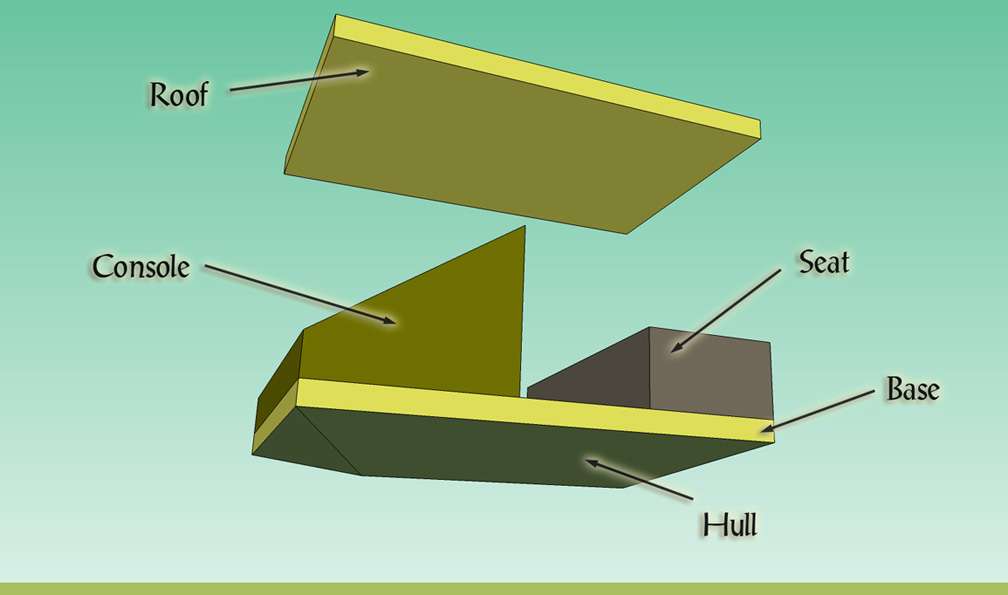
A basic car model is made up of four portions. If your car has a roof then there are five portions. Coaster cars generally have sidewalls when they are covered by a roof. Because sidewalls are usually broad expanses of glass or open spaces without any walls we'll consider the sidewalls as an extension of the roof. |
||||
|
|
|
|
|
|
|
|
||||
|
In the airline industry basic plane design starts out with a decision as to how many aisles and passenger seats are desired across the body of the plane, a circle is drawn around that, and then the length of the plane is decided. Inside that the pilots are put at the front, baggage is located below the passengers, the fuel tanks go in the wings, and everything else in the plane is designed around that. We should approach the design of our car in the same way. |
||||
|
|
|
|
|
|
|
The bottom of our car base, the part of the base that is flush with the top of the hull, should be at Z=0. The hull is the only part that should be below Z=0 and this is how you should view your car model until it's Imported into RCT3 and you've confirmed that the positioning of your car needs to be different from this. Your car base could be loosely considered the parent shape. The hull, seat, console, and roof should be pushed and pulled from that, and viewed as the child shapes. |
||||
|
|
|
|
|
|
|
There are few things as disappointing as beautifully crafting & intricately texturing a piece of custom scenery only to find that the scale and positioning of it is off when its in the game. This disappointment is increased when we have to return to our modeler, back- |
||||
|
|
|
|
|
|
|
No matter how experienced we become in custom car creation, each time we create a new custom car model the best plan of action would be to create a basic car shape, add Andrew & the required number of his clones, decide on the seating position of the guests and the required height for the seats, configure & adjust the basic shapes of the seating, decide the shape of the console, and Import the car to confirm you're happy with the way the car interacts with the guests & interacts with the track. Only after we're happy with that should we add a roof (if desired) & the hull, and then get fancy with our car's design. |
||||
|
|
|
|
|
|
|
About mid- |
||||
|
|
|
|
|
|
|
Guests sit (or stand) in different locations in relation to the position of their Peep effect in the modeler and this differs depending on the Peep Sitting Position that you choose for your guests when they're riding your car and the location of Z=0 (the track splines) in each rail piece that makes up the track type that your car is going to become a part of. You'd definitely want to be a hundred percent certain of your Peep effect positions and your chosen Peep Sitting Position before setting up your restraints in the Importer. You wouldn't want to be in the position of having set up your restraint bones and meshes in the Importer and then decide after that that you want a different Peep Sitting Position because if you did so you'd have no alternative but to clear all the bones from the Importer's Bones dialog and start over from scratch re- |
||||
|
|
|
|
|
|
|
Right after adding any restraints, re- |
||||



|
|
|
|
|
|
|
Drag the above toggle to a convenient place on your screen. |
|
|
|
|
The Ultimate CTR Creator




To view the slider, click on a thumbnail.
| Viewing Full-Sized Images On This Website |
| Effective Park Design: The Best Start For Your Park, Page 2 |
| Master Maps And Guest AI, Page 2 |
| Guest Generation, Park Capacity, And Peep Factory, Page 2 |
| Setting Up And Switching Your Park Entrance, Page 2 |
| Theming Our Stalls & Facilities, Page 2 |
| Our VIP Blue Book, Page 2 |
| Our VIP Blue Book, Page 3 |
| Our VIP Blue Book, Page 4: Spot The VIP's |
| Volitionist's RCT3 Animal Care Guide, Page 2 |
| Volitionist's RCT3 Animal Care Guide, Page 3 |
| Volitionist's RCT3 Animal Care Guide, Page 4 |
| How To Unlock All Campaign Scenarios, Page 2 |
| The Care And Feeding of Custom Downloads, Page 2 |
| The Care And Feeding of Custom Downloads, Page 3 |
| The Care And Feeding of Custom Downloads, Page 4 |
| RCT3 Cheats & Unlockables, Page 2 |
| Options.txt Flags, Page 2 |
| Options.txt Flags, Page 3 |
| RCT3 Keyboard & Mouse Controls: Advanced |
| RCT3 Keyboard & Mouse Controls: Freelook |
| RCT3 Keyboard & Mouse Controls: Isometric |
| RCT3 Keyboard & Mouse Controls: Normal |
| Guests Departing The Station But Not Returning |
| Guests Knocked Over |
| People Spilling Down Stairs |
| Lost Staff |
| ReAppearing Invisible Vendors |
| Park File Thumbnails |
| RCT3 Freezes |
| Earthquakes and Plumbing |
| The Importer |
| SketchUp |
| Reviewing RCT3’s History, Page 2 |
| Chris Sawyer, Page 2 |
| Showcase!: Fall 2020, TNS Pool Paths & TNS Pool Terrain, Page 2 |
| Showcase!: Fall 2020, TNS Pool Paths & TNS Pool Terrain, Page 3 |
| Showcase!: Fall 2020, TNS Pool Paths & TNS Pool Terrain, Page 4 |
| Showcase: Spring 2019 - DasMatze's Fences & Railings, Page 2 |
| Showcase: Spring 2019 - DasMatze's Fences & Railings, Page 3 |
| Showcase: Spring 2019 - DasMatze's Fences & Railings, Page 4 |
| Showcase: Fall 2018 - L-33/Lee, Page 2 |
| Showcase: Fall 2018 - L-33/Lee, Page 3 |
| Showcase: Fall 2018 - L-33/Lee, Page 4 |
| Showcase: Spring 2018 - Spez Mies Wall Set, Page 2 |
| Showcase: Winter 2017 - Mr. Sion's Tiki Bar, Page 2 |
| Showcase: Fall 2017 - Polynesian Panic, Page 2 |
| Hall of Fame: Belgabor's Invisible Doodads |
| Hall of Fame: Spice's Invisible Pool CS |
| Hall of Fame: GTT's Hedge Maze |
| Hall of Fame: GTT's Glas Labyrinth |
| Hall of Fame: Joey's Park CleanUp |
| Hall of Fame: GTT's Hedge Maze, Page 2 |
| My Adventures In SketchUp |
| CSO's I Have Imported |
| TexMod Customized Add-Ins |
| My Parks |
| Videos |
| Screenshots |
| Advertisement Land |
| Intrepid: A Revolution In Design |
| Structure And Ride Supports Set |
| CSO Study: GTT’s Hedge Maze |
| Wonderland Themed Playing Card Railings |
| Architectural Chess |
| Mini Chess |
| Planters 'n' Fountains Set |
| Intrepid: A Revolution In Design, Page 2 |
| Intrepid: A Revolution In Design, Page 3 |
| Intrepid: A Revolution In Design, Page 4 |
| Structure And Ride Supports Set, Page 2 |
| Café, Update 1 |
| Path Add-Ons, Update 1 |
| Planters And Pool Fencing, Page 2 |
| Landscaping And Park Grounds, Page 2 |
| Walls, Tunnels, And Fences, Page 2 |
| Decking, Stairs, And Balustrades Set, Page 2 |
| Decking, Stairs, And Balustrades Set, Page 3 |
| CFR & CTR CSO's, Page 2 |
| CFR & CTR CSO's, Page 3 |
| CFR & CTR CSO's, Update 1, Page 1 |
| CFR & CTR CSO's, Update 1, Page 2 |
| TexMod Tutorial |
| My TexMod Skies |
| TexMod MakeOvers For My Park |
| TexMod MakeOvers For My Park, Page 2 |
| Vanguard West |
| Vanguard West: Financial Report |
| Hillside On The Lake |
| Hillside On The Lake: Financial Summary |
| A Woodland Clearing |
| Vanguard West, Page 2 |
| Vanguard West, Page 3 |
| Vanguard West, Page 4 |
| Vanguard West, Page 5 |
| Vanguard West, Page 6 |
| Vanguard West: Financial Report, Page 2 |
| Vanguard West: Financial Report, Page 3 |
| Hillside On The Lake, Page 2 |
| Hillside On The Lake, Page 3 |
| Hillside On The Lake, Page 4 |
| Hillside On The Lake, Page 5 |
| Hillside On The Lake, Page 6 |
| Hillside On The Lake: Financial Summary, Page 2 |
| Hillside On The Lake: Financial Summary, Page 3 |
| Hillside On The Lake: Financial Summary, Page 4 |
| Hillside On The Lake: Financial Summary, Page 5 |
| A Woodland Clearing, Page 2 |
| Screenshots, Page 2 |
| Screenshots, Page 3 |
| Screenshots, Page 4 |
| Screenshots, Page 5 |
| Advertisement Land, Page 2 |
| Collaborations - Custom Content |
| Collaborations - Parks |
| L-33's POE Building 4 Set |
| RCT2 Wonderland Themed CSO's |
| The Crüe |
| L-33's POE Building 4 Set, Page 2 |
| RCT2 Wonderland Themed CSO's, Page 2 |
| POE Building 4 Set Presentation Park |
| POE Building 4 Set Presentation Park, Page 2 |
| POE Building 4 Set Presentation Park, Page 3 |
| POE Building 4 Set Presentation Park, Page 4 |
| POE Building 4 Set Presentation Park, Page 5 |
| How To Use Park CleanUp, Page 2 |
| How To Use Park CleanUp, Page 3 |
| Park Admission, Ride Pricing, And EI&N, Page 2 |
| Maximizing Your Small Park's Real Estate, Page 2 |
| Park Shuttle Configurations, Page 2 |
| Elevated Coaster Stations And Access Options, Page 2 |
| Suspended Pools And Guest Access Options, Page 2 |
| Terrain Painting - Artistry In Landscaping, Page 2 |
| Terrain Painting - Artistry In Landscaping, Page 3 |
| How To Build A Great Park, Page 2 |
| Optimize Your System And Enhance Your Gaming Experience, Page 2 |
| Custom Scenery |
| TexMod ReTexture Packs |
| Miscellaneous |
| Parks, Scenarios, & Sandboxes |
| Coasters, Rides, & Attractions |
| Structure And Ride Supports - Original Concrete |
| Structure And Ride Supports - Hewn Brick |
| RCT2 Wonderland Themed Set |
| RCT2 Revival Crüe Chess |
| FTA's Invisible Stall With Invisible Vendor |
| RCT3 Launch Screen Slideshow Template |
| Dark Ride Enclosure Toppers |